Web2App Configuration

GoodEnough

Active Member
Hey guys, I hope there is someone who can help with Web2App config using AppsFlyer.

Can't make it work although everything is supposedly done according to AppsFlyer docs for Google Ads Web integration.

Campaign type: pMax
Final URL – App Store URL

Tracking Template (at the campaign level): https://app.appsflyer.com/MYAPPID?pid=googleads_int&c={campaign}&af_siteid={placement}&af_channel={network}&af_keywords={keyword}&af_c_id={campaignid}&af_adset={adgroup}&af_adset_id={adgroupid}&af_ad_id={creative}&af_click_lookback=7d&af_force_transparent=true&af_r={lpurl} – I just made this link, didn't use attribution link tab in the integration (can it be the root of the problem?)

Google Ads Web integration is up and running, conversion actions are created in Google Ads and Conversio IDs pasted into relevant fileds in the AppsFlyer.
Yet, there are no installs / in-app events or even googleads_int source in the AppsFlyer dashboards and 0 web2app conversions triggered in Google Ads itself.

Also, after hours with Claude it suggested that I have to add apps.apple.com to redirect allowlist in the AppsFlyer – any thoughts on this?

What am I doing wrong? Kinda losing it at this point. Thanks for any suggestions.
 

Attachments

  • Screenshot 2026-03-23 at 13.52.18.png
    Screenshot 2026-03-23 at 13.52.18.png
    239.3 KB · Views: 10
You are definitely missing important steps:

-Yes, the apps.apple.com must be allowed in the redirect allowlist and Google has to approve it on their side too
-Yes, you must use the Google Ads Web link integration (otherwise you won't see anything on Appsflyer)
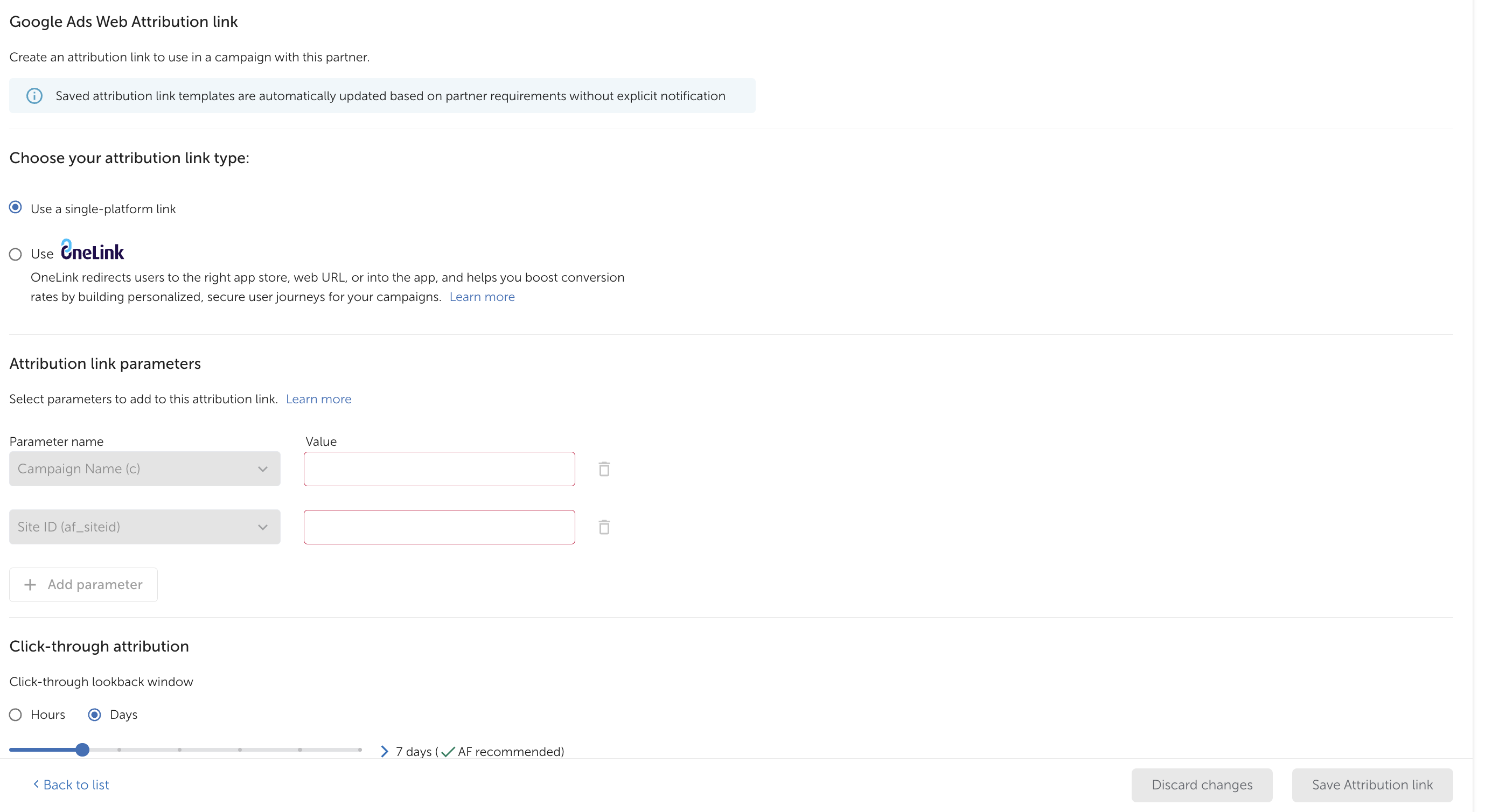
-You are missing a LOT of mandatory parameters in the link (attaching screenshots)

I still recommend appstack - the setup takes less than 5 mins and the attribution is better.

1774279561166.png

1774279571891.png
 
You are definitely missing important steps:

-Yes, the apps.apple.com must be allowed in the redirect allowlist and Google has to approve it on their side too
-Yes, you must use the Google Ads Web link integration (otherwise you won't see anything on Appsflyer)
-You are missing a LOT of mandatory parameters in the link (attaching screenshots)

I still recommend appstack - the setup takes less than 5 mins and the attribution is better.

View attachment 39

View attachment 40
Thanks a ton! Could you elaborate on "and Google has to approve it on their side too" part, please? Everything else is understandable and I will update it in no time.

Re AppStack – I'd also prefer hustle-free solution, but the app literally just starting out and they're scared away by 0.05 per install pricing.

Thanks so much!
 
Google has to also allowlist the domain on their side or at least check that the redirection is correctly setup (contact your AM regarding that)
Re Appstack - you have 10k free attributions to test and see if the campaign is worth but up to you!
 
Google has to also allowlist the domain on their side or at least check that the redirection is correctly setup (contact your AM regarding that)
Re Appstack - you have 10k free attributions to test and see if the campaign is worth but up to you!
Couldn't find relevant setting on Google's end, but will defo update the link and allowlist apps apple in the AppsFlyer. Thanks a lot!
 
there's no setting option for that - your account manager has to check that internally in their internal dashboard :)
glad to read it was helpful!
 
there's no setting option for that - your account manager has to check that internally in their internal dashboard :)
glad to read it was helpful!
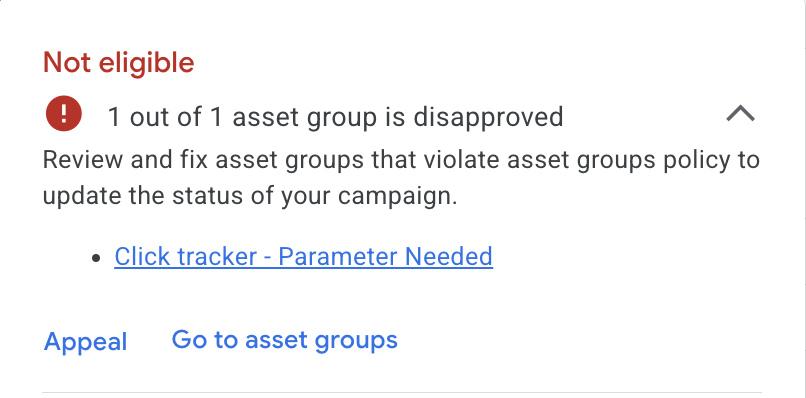
Hey, I'm really sorry for bringing this up again, but once I reconfigured everything it just disapproved my ads. That's the moment where I have to have an Account Manager to sort it out?
 

Attachments

  • Screenshot 2026-03-27 at 11.36.22.png
    Screenshot 2026-03-27 at 11.36.22.png
    59.1 KB · Views: 4
Hey, I'm really sorry for bringing this up again, but once I reconfigured everything it just disapproved my ads. That's the moment where I have to have an Account Manager to sort it out?
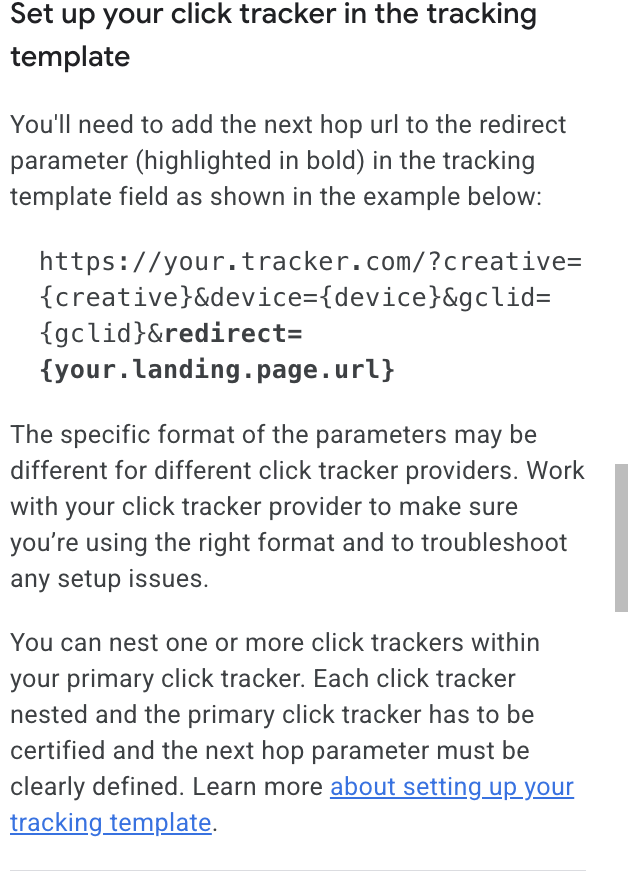
did you put all the parameters that I pasted? did you take the link from the partner section and put it in the campaign level? that error is due to missing parameters, not allowlisted domains but you'll still need that as well
 
Yep, copied your setup completely. Only added thing is af_channel={network}

Overall, looks like this:

https://app.appsflyer.com/APPID?pid=googleads_int&c={campaign.name}&af_siteid=web2app&af_force_transparent=true&af_ios_url={lpurl}&af_web_dp={lpurl}&af_c_id={campaignid}&af_adset_id={adgroupid}&af_adset={adgroupid}&af_ad_id={creative}&af_ad={creative}&gclid={gclid}&gbraid={gbraid}&wbraid={wbraid}&af_android_url={lpurl}&af_keywords={keyword}&af_channel={network}&af_click_lookback=7d

That's what I pasted into Campaign URL Options – Tracking template.

apps.apple.com added to the allowlist in the AppsFlyer.
 
I just realized you're not using onelink template. You must create a OneLink template for that too
Hey, nope I haven't added add apple.com, thanks for that! Screenshot of the policy flag in the attached.

I though using Single Platform link is enough? AppsFlyer specifcially says that this is okay method, especially if I have the app only on one platform?
 

Attachments

  • Screenshot 2026-03-27 at 18.25.33.png
    Screenshot 2026-03-27 at 18.25.33.png
    165.4 KB · Views: 2
I guess single link should work but I've been always told to go with OneLink so give it a try. The error is due to this parameters: 1774850919263.png

Make sure you added them!
 
Back
Top