Meta W2A with Meta Web (Appsflyer) No Installs Tracked. Anyone Experienced This?

Jack811

Active Member
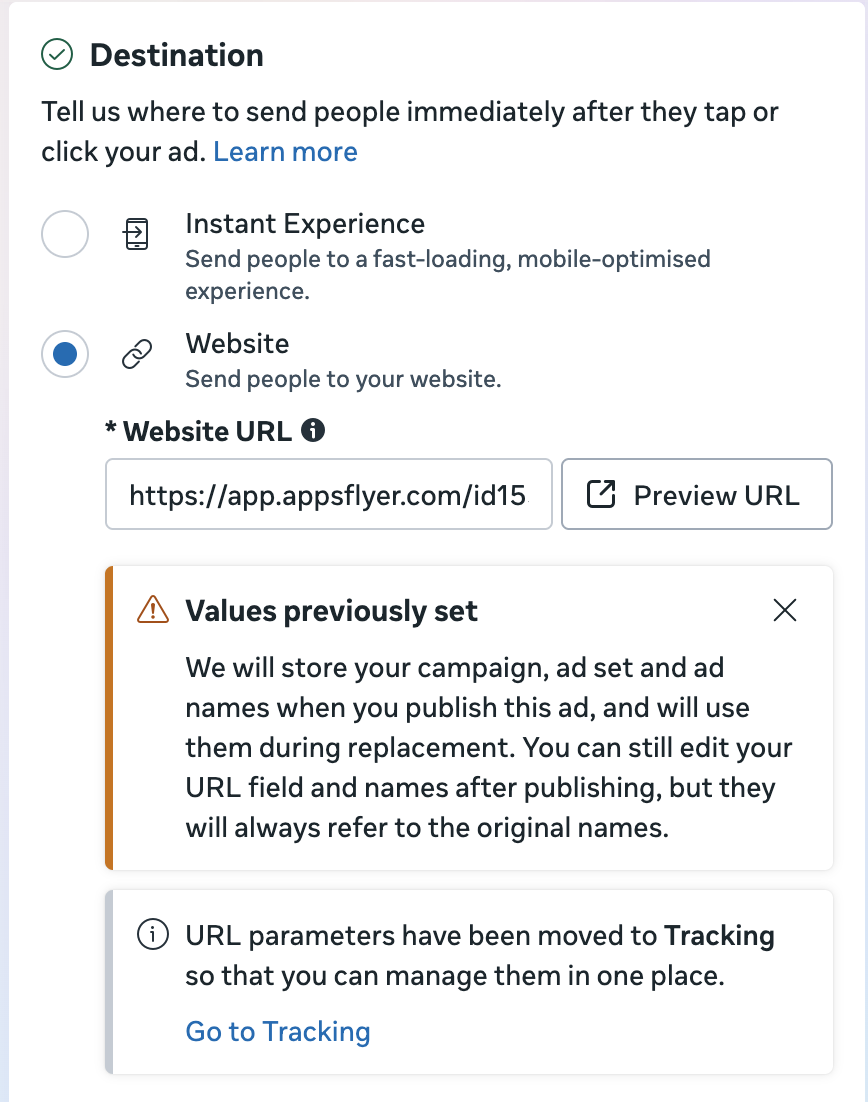
I’m currently running a Sales campaign on Meta using the MetaWeb attribution link from Appsflyer as my landing page URL.
The setup follows both Meta and Appsflyer documentation:
  • Using the MetaWeb tracking link as the final URL
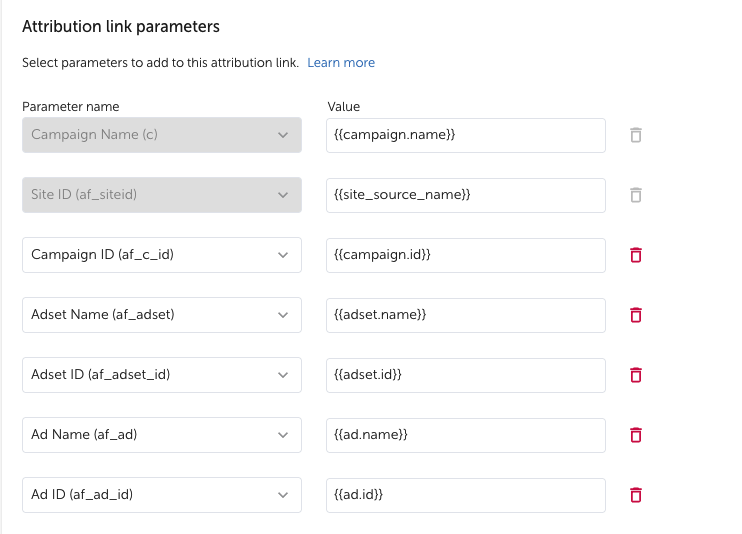
  • All required dynamic parameters included (campaign, adset, ad, IDs, etc.)
However, despite recording thousands of clicks in Meta Ads Manager, Appsflyer shows zero installs and no attributed data.
There’s no indication of traffic being received on either Appsflyer or Meta Ads Manager.
Has anyone here successfully implemented this Web-to-App (W2A) flow using MetaWeb + Appsflyer tracking link as the landing page?
 
That's odd - are you sure you linked the pixel correctly? check the API access token and the pixel ID
 
Yes, I’ve checked all of them. After the first campaign recorded no installs, I created a second campaign using a new access token to test again, but the results were the same. Could you kindly share how you set up Meta Ads w2a?
I’m currently running a Sales campaign on Meta using the MetaWeb attribution link from Appsflyer as my landing page URL.
The setup follows both Meta and Appsflyer documentation:
  • Using the MetaWeb tracking link as the final URL
  • All required dynamic parameters included (campaign, adset, ad, IDs, etc.)
However, despite recording thousands of clicks in Meta Ads Manager, Appsflyer shows zero installs and no attributed data.
There’s no indication of traffic being received on either Appsflyer or Meta Ads Manager.
Has anyone here successfully implemented this Web-to-App (W2A) flow using MetaWeb + Appsflyer tracking link as the landing page?
 
I don't have the best tech view of this, but I see my W2A conversions in Appsflyer as Facebook, not metaweb anymore
You're right, the AM from Appflyer also noticed me about this. However, I did check with the AF support team to check only raw data for metaweb_int. There wasn't any data
 
I don't have the best tech view of this, but I see my W2A conversions in Appsflyer as Facebook, not metaweb anymore
I cant share this in a message. But essentially you should follow these steps:
1- you create the pixel and attach the pixel ID ID + access token
2- Advanced privacy toggle must be OFF
3- Map the AF event to Meta events as "CUSTOM" and include value & Revenue
4- Create a onelink template only for iOS
5 - Add the attached parameters
6 - Once the events appear in the events manager, you should accept the custom events
7 - run the campaigns

That's it!

1771945283289.png
 
I cant share this in a message. But essentially you should follow these steps:
1- you create the pixel and attach the pixel ID ID + access token
2- Advanced privacy toggle must be OFF
3- Map the AF event to Meta events as "CUSTOM" and include value & Revenue
4- Create a onelink template only for iOS
5 - Add the attached parameters
6 - Once the events appear in the events manager, you should accept the custom events
7 - run the campaigns

That's it!

View attachment 13
Screenshot 2026-02-24 at 23.57.46.png
When you say advanced privacy toggle must be OFF, you mean this one?
 
I cant share this in a message. But essentially you should follow these steps:
1- you create the pixel and attach the pixel ID ID + access token
2- Advanced privacy toggle must be OFF
3- Map the AF event to Meta events as "CUSTOM" and include value & Revenue
4- Create a onelink template only for iOS
5 - Add the attached parameters
6 - Once the events appear in the events manager, you should accept the custom events
7 - run the campaigns

That's it!

View attachment 13
I believe I did most of the steps that you've listed, except for 4th one. What do you mean by creating a OneLink template for IOS & do you send AF from all media source including organic to Meta?

The guide that I received only require to build parameter on AF & Meta Ads when creating a new ad, pasting the click attribution link to the destination section and It should be ready to launch
 

Attachments

  • Screenshot 2026-02-25 at 09.58.39.png
    Screenshot 2026-02-25 at 09.58.39.png
    291.1 KB · Views: 13
  • Screenshot 2026-02-25 at 09.59.47.png
    Screenshot 2026-02-25 at 09.59.47.png
    187.5 KB · Views: 12
View attachment 15
When you say advanced privacy toggle must be OFF, you mean this one?
Yes I mean that one!

I believe I did most of the steps that you've listed, except for 4th one. What do you mean by creating a OneLink template for IOS & do you send AF from all media source including organic to Meta?

The guide that I received only require to build parameter on AF & Meta Ads when creating a new ad, pasting the click attribution link to the destination section and It should be ready to launch
No, you need to create a onelink template on AF which naturally includes the parameters I shared so in the Metaweb integration module, if you go to the tracking link tab, you will select that template and within there, you should add the parameters I pasted above.

If you just hard-put the parameters in a link, that won't work and that is surely the reason why you dont see any installs.

If you can send ALL media sources in the beginning, do it so you unlock the events earlier. However, I do not recommend leaving that option as it will cause huge discrepancies between Meta and Appsflyer according to my experience.
 
I think I see the differences between my setup and yours. I do create a OneLink template on AF exactly like yours, but I also fill in the parameters on the Meta Ads side. I'm gonna do a quick adjustment and run a link click campaign to see if it works.
 
I think I see the differences between my setup and yours. I do create a OneLink template on AF exactly like yours, but I also fill in the parameters on the Meta Ads side. I'm gonna do a quick adjustment and run a link click campaign to see if it works.
You should build the parameters on Meta side as well btw. Using appsflyer onelink template as final url is not enough afaik
 
@davamosk or @Jack811 have either of you run into a scenario where you go to create a new web data set in Meta in order to create the token needed for the AF OneLink for W2A, but the web option is grayed out? Do either of you know how to troubleshoot this?
 

Attachments

  • Screenshot 2026-04-27 at 4.51.07 PM.png
    Screenshot 2026-04-27 at 4.51.07 PM.png
    172.8 KB · Views: 5
@davamosk or @Jack811 have either of you run into a scenario where you go to create a new web data set in Meta in order to create the token needed for the AF OneLink for W2A, but the web option is grayed out? Do either of you know how to troubleshoot this?
I assume you hit the maximum? try to delete any inactive dataset and see
I never got that issue
 
Hey guy, after going back & forth with the Meta Support & multiple tries & errors, I can run the W2A campaign with the click tracking link now. The trick is sending all postback from all mediasource & organic. This way you can target directly trial & purchase. So far, the data look quite reliable but still need monitoring.

Hope this is helpful for anyone who is looking for insight to run W2A on Meta.
 
Back
Top